Best Clocking In Machine for Small Business UK
The best clocking in machine for small business UK owners with one site and up to 30 hourly staff is usually a standalone terminal that accepts cards or fobs and exports records to a spreadsheet over USB.

The best clocking in machine for small business UK owners with one site and up to 30 hourly staff is usually a standalone terminal that accepts cards or fobs and exports records to a spreadsheet over USB. It's inexpensive to buy, has no monthly fee and avoids collecting biometric data unless you choose that option. For staff working across multiple sites or travelling in vans, a phone app is a more practical choice than a wall-mounted machine.
This guide draws on the ICO's biometric recognition guidance, TimeTally's UK clocking-in guide, Computime's biometric vs RFID comparison and Amazon UK listings. TimeTally and Computime both sell clocking systems, so we cite them for facts, not verdicts. We have not tested these machines ourselves. The terminals on this page are sold by third-party sellers. The Mokhike, TimeRalo, NGTeco and QuickClocks offers are dispatched by Amazon.
We may earn a commission if you buy through links on this page. It never changes our verdicts. How we review.
Quick picks
- Best card, fob and PIN terminal (biometrics optional): Mokhike E230
Check price on Amazon - Best budget standalone: TimeRalo TL2 (fingerprint and PIN, USB export)
- Best Wi-Fi cloud terminal: NGTeco TC1
Check price on Amazon - Best subscription cloud terminal: uAttend JR2000 (subscription)
- Best for field staff: a phone app with location checks (no box to buy)
- Paper option: QuickClocks QC500N card clock, only if you want physical clock cards
3-year cost table and method chooser
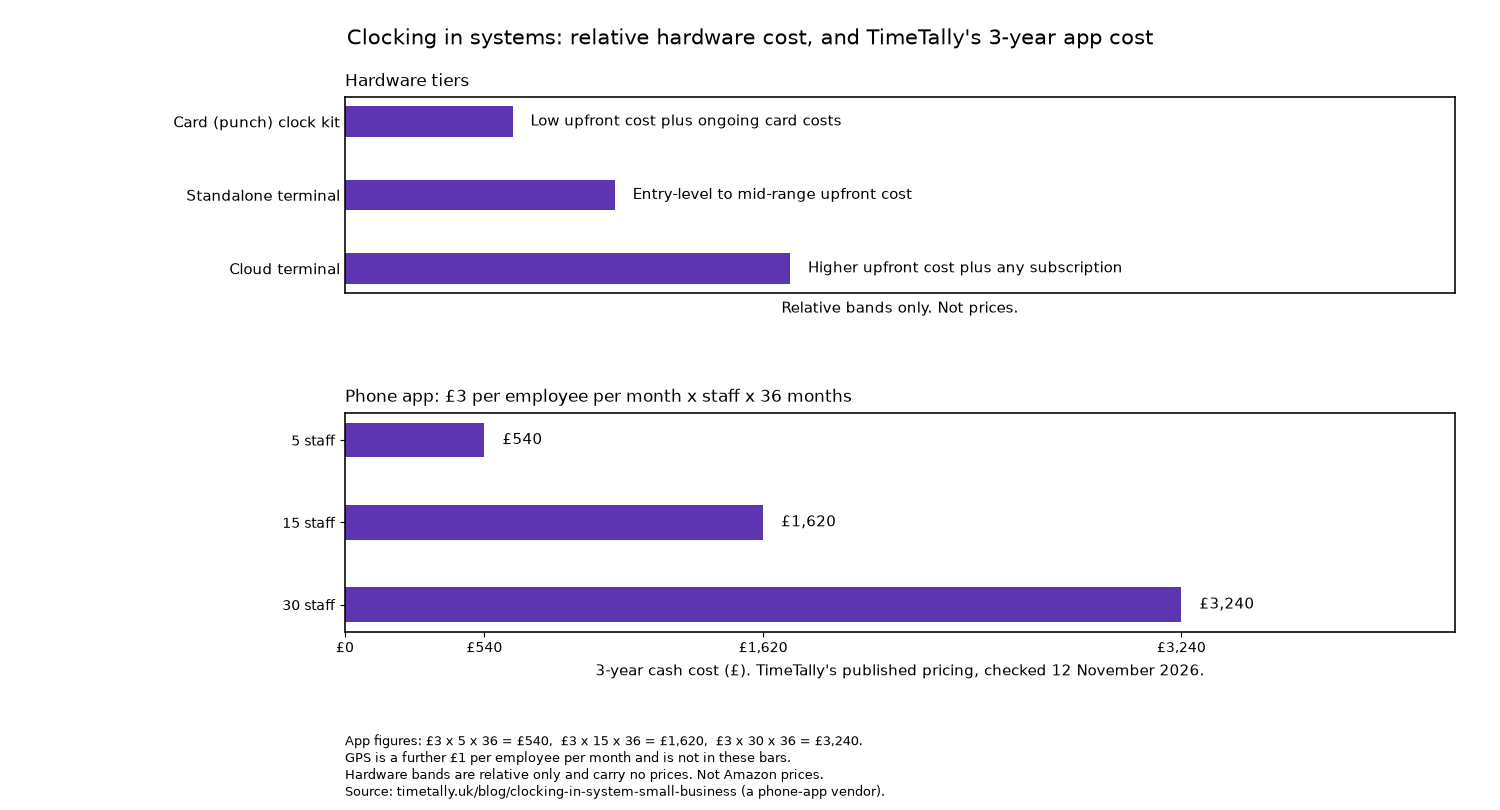
Hardware is described in words, not pounds. A card kit is a low upfront cost plus ongoing card costs. A standalone terminal is an entry-level to mid-range upfront cost. A cloud terminal is a higher upfront cost plus any subscription. TimeTally's published pricing, checked 12 November 2026, is £3 per employee per month, plus £1 for GPS. The staff columns are a 3-year total. For the phone app they use the £3 rate only: £3 x staff x 36 months, which is £540 for 5 staff, £1,620 for 15 staff and £3,240 for 30 staff. As TimeTally sells the app, those figures are its own pricing, not Amazon prices.
| System | Upfront | Ongoing | 5 staff | 15 staff | 30 staff |
|---|---|---|---|---|---|
| Card (punch) clock kit | Low upfront cost plus ongoing card costs | Replacement cards | Low upfront cost plus ongoing card costs | Same | Same, and more racks if the team grows |
| Standalone terminal (card, fob, PIN or finger) | Entry-level to mid-range upfront cost | Usually none | Entry-level to mid-range upfront cost | Same | Same (check user capacity) |
| Cloud terminal | Higher upfront cost plus any subscription | Software fee, if charged | Higher upfront cost plus any subscription | Same | Same |
| Phone app (TimeTally, £3 per employee per month) | £0 | Per person | £540 | £1,620 | £3,240 |
TimeTally makes a fair point: also count the staff time spent turning clock records into payroll.
Which method?
- One site, everyone walks past one door: A card or fob terminal. Add a PIN backup for anyone who forgets their card, as recommended in Computime's standard set-up.
- Several sites, one manager: Put a cloud terminal at each entrance so all the records are brought together in one place.
- Staff at clients or in vans: A phone app with location checks at clock-in and clock-out.
- Phones banned on the floor (food, cleanrooms): Choose a terminal. TimeTally, which sells an app, also recommends this approach.
- Buddy punching is a measured, costly problem: Consider fingerprint or face recognition, but only after completing a DPIA and providing a non-biometric alternative (see the next section).
UK GDPR and fingerprint clocking: read this first
Fingerprints are a prominent feature of many clocking machines on Amazon UK. However, the ICO's guidance highlights three important points:
- It is special category data. Biometric data used to identify people requires an Article 9 condition as well as a lawful basis.
- A DPIA is highly likely. The ICO says biometric recognition is highly likely to trigger the need for a Data Protection Impact Assessment.
- Offer an alternative. Staff may not feel they have a genuine choice. Anyone who does not consent should therefore be able to use a card, fob or PIN without penalty.
In February 2024, the ICO ordered Serco Leisure to stop using facial and fingerprint scanning to monitor attendance. The ICO also says its biometric guidance is under review following the Data (Use and Access) Act. By comparison, card and fob data is ordinary personal data, according to Computime. This is general information, not legal advice.
Whichever system you choose, keep the records. GOV.UK's National Minimum Wage page explains that HMRC officers can check at any time and ask to see payment records, and faking them is a criminal offence. Clocked hours provide the evidence behind them.
The picks
Mokhike E230: best card, fob and PIN terminal
According to the listing, the Mokhike E230 supports fingerprint recognition, RFID cards (10 included) and PIN entry. It has capacity for 1,000 fingerprints, 500 passwords, 500 cards and 100,000 logs. Other features include a 2.4 inch colour screen, an English interface and voice prompts. Excel reports can be exported to the included 8 GB USB stick, with no software or monthly fee required. It is sold by a third-party seller and dispatched by Amazon.
Who it's for: one-site shops and cafés that want to use cards or PINs now, with the option of adding fingerprints later. Who it isn't for: businesses with staff across multiple sites, as data can only be transferred using a USB stick.
Check price on AmazonTimeRalo TL2: best budget standalone
The listing says there is no Wi-Fi, software or monthly fee. Records transfer to Excel over USB, and the terminal supports up to 500 fingerprints and 50,000 punch records. A backup system also retains data through power cuts. It accepts fingerprints and PINs but not cards. A details field on the same listing says LAN, which does not match the no-Wi-Fi title, so confirm the ports before you buy. It is sold by a third-party seller and dispatched by Amazon.
Who it's for: small teams looking for a simple, standalone clocking machine. Who it isn't for: businesses that want to avoid biometrics. Staff would need to use PINs instead, which, as TimeTally points out, can be shared.
Check price on AmazonNGTeco TC1: best Wi-Fi cloud terminal
The NGTeco TC1 supports fingerprint, RFID, PIN and face recognition. It can handle up to 200 users and 30,000 logs, with connectivity through LAN or 2.4 GHz Wi-Fi. It also continues recording if the network goes down and syncs the data once the connection returns. According to the listing, the cloud service and admin app are free. A separate TimeEntrix subscription is needed for the full employee app with GPS check-in. It is sold by a third-party seller and dispatched by Amazon.
Who it's for: business owners who want to view staff hours in a browser rather than transferring records with a USB stick. Who it isn't for: anyone who wants the full employee app, including GPS check-in, without a separate TimeEntrix subscription.
Check price on AmazonuAttend JR2000: best subscription cloud terminal
The uAttend JR2000 combines fingerprint, RFID and PIN clocking with a connection to uAttend's cloud service. The listing describes the service as a low-cost subscription that includes reporting and remote management. The specification table lists Ethernet. The product description also mentions Wi-Fi and LAN, so confirm the connection on the listing. It is sold by a third-party seller.
Who it's for: businesses that prefer a supported service to a standalone gadget. Who it isn't for: anyone who wants to avoid monthly fees.
Check price on AmazonQuickClocks QC500N: the paper option
The QuickClocks QC500N is an automatic card clock with six print columns and an automatic card feed. Cards and the rack are sold separately, while QuickClocks' monthly cards are available in packs of 100. It does not calculate hours, so someone still needs to add up the figures on each card. The clock and the card pack are each sold by a third-party seller and dispatched by Amazon.
Who it's for: business owners who prefer a physical card record and no digital data at all. Who it isn't for: anyone who wants to avoid calculating staff hours manually.
Check price on Amazon Check price on AmazonField staff: a phone app
No box to buy. Apps such as TimeTally charge £3 per employee per month, plus £1 for GPS. That is TimeTally's published pricing, checked 12 November 2026. The app checks location only when staff clock in and out. A geofence confirms where the phone was, not who was holding it. No affiliate link.
Before you buy: 5 questions
- How do hours reach payroll: USB stick, spreadsheet or a direct export?
- What happens with a missed clock-out, and who fixes it?
- Are breaks recorded? (See GOV.UK on rest breaks.)
- Can staff edit their own times?
- If biometric: what is the alternative, and who writes the DPIA?
Already ringing up sales? Take a look at our cash register guide, card machine guide and receipt printer guide.
FAQ
Is a fingerprint clocking machine legal in the UK?
Yes, subject to certain conditions. The ICO classifies biometric data used for recognition as special category data. A DPIA is highly likely to be required, and staff must have access to a non-biometric alternative.
How much does a clocking in system cost?
A card kit is a low upfront cost plus ongoing card costs. A standalone terminal is an entry-level to mid-range upfront cost. A cloud terminal is a higher upfront cost plus any subscription. TimeTally's published pricing, checked 12 November 2026, is £3 per employee per month. Over 3 years that is £540 for 5 staff, £1,620 for 15 staff and £3,240 for 30 staff (£3 x staff x 36 months). Those app figures are TimeTally's, not Amazon prices.
Do I need software with a clocking machine?
Standalone terminals can export records to Excel over USB without software. Cloud terminals use the manufacturer's web service, which may involve a fee.
Card, fob or app?
A card or fob is suitable for a single site, while an app works better for staff who are regularly on the move. Fingerprint recognition should only be considered once the necessary GDPR work has been completed.
As an Amazon Associate I earn from qualifying purchases.
More from mbusinessdaily: Business, sole trader vs limited company and how we review.