Best Webcam for Small Business UK (2026)
The Logitech Brio 300 suits most desks: 1080p video, a privacy shutter and a USB-C cable. The C925e is built for a slow shared connection, and the HP 625 fits two people.

The best webcam for small business in the UK is the Logitech Brio 300 for most desks. It offers 1080p video, automatic light correction, a noise-reducing microphone, a built-in privacy shutter and a USB-C cable. The listing also confirms certification for Zoom, Microsoft Teams and Google Meet. For offices sharing a slow connection, the Logitech C925e is designed to cope with limited bandwidth. If two people need to fit on screen, the HP 625 offers the widest view of the cameras here.
Specs come from Logitech's and HP's product pages, the Amazon UK listings, TechRadar's Logitech webcam guide and Microsoft's Teams network guidance, checked on 24 November 2026. We have not tested these webcams ourselves; this guide brings published information together.
Jump to: Quick picks · Call-setup table · The webcams · How to choose · Free fixes · FAQ
We may earn a commission if you buy through links on this page. It never changes our verdicts. How we review.
Quick picks
- Best overall: Logitech Brio 300 (1080p, privacy shutter, USB-C)
- Best picture for the money: Logitech C920 HD Pro (1080p/30, glass lens, autofocus, stereo mics)
- Best for shared office bandwidth: Logitech C925e (H.264 with Scalable Video Coding, privacy shutter)
- Best for two people or a small room: HP 625 FHD (66°, 78° or 92° field of view)
- Best budget: Logitech Brio 100 (1080p, privacy slider, USB-A)
Call-setup table
Most small businesses need one camera per desk, so start from the call, not the spec sheet. Teams sends up to 1080p at up to 30 frames per second when bandwidth allows, per Microsoft, and TechRadar notes that Zoom and Teams cap most calls at 1080p/30, while Google Meet goes to 720p. A 4K webcam gives you little extra on a normal call.
| Budget tier | Pick | Resolution | Field of view | Privacy shutter | Mic | Connection | Who it isn't for |
|---|---|---|---|---|---|---|---|
| Budget | Logitech Brio 100 | 1080p | 58° (listing) | Yes, slider | Built-in mic | USB-A | Noisy rooms; pair it with a headset |
| Mid | Logitech Brio 300 | 1080p | 70° | Yes, spin shutter | Mono, noise-reducing | USB-C | Desks with only USB-A ports and no adapter |
| Mid | Logitech C920 HD Pro | 1080p/30 | 78° | No cover on the listing | Dual stereo mics | USB-A | Anyone who wants a built-in cover |
| Business | Logitech C925e | 1080p/30 | 78°, fixed | Yes, integrated | Dual omnidirectional, up to 1m | USB-A | Groups round a table; TechRadar says it suits individuals |
| Business | HP 625 FHD | 1080p/30, 720p/60 | 66°, 78° or 92° | Yes, privacy cap | Dual noise-reducing | USB-A 3.0 | Mac users: the listing names only Windows 10 and 11 |
Connections and fields of view are from Logitech's pages, the C925e datasheet and Brio 300 specification, the HP 620/625 spec sheet and the Amazon UK listings.
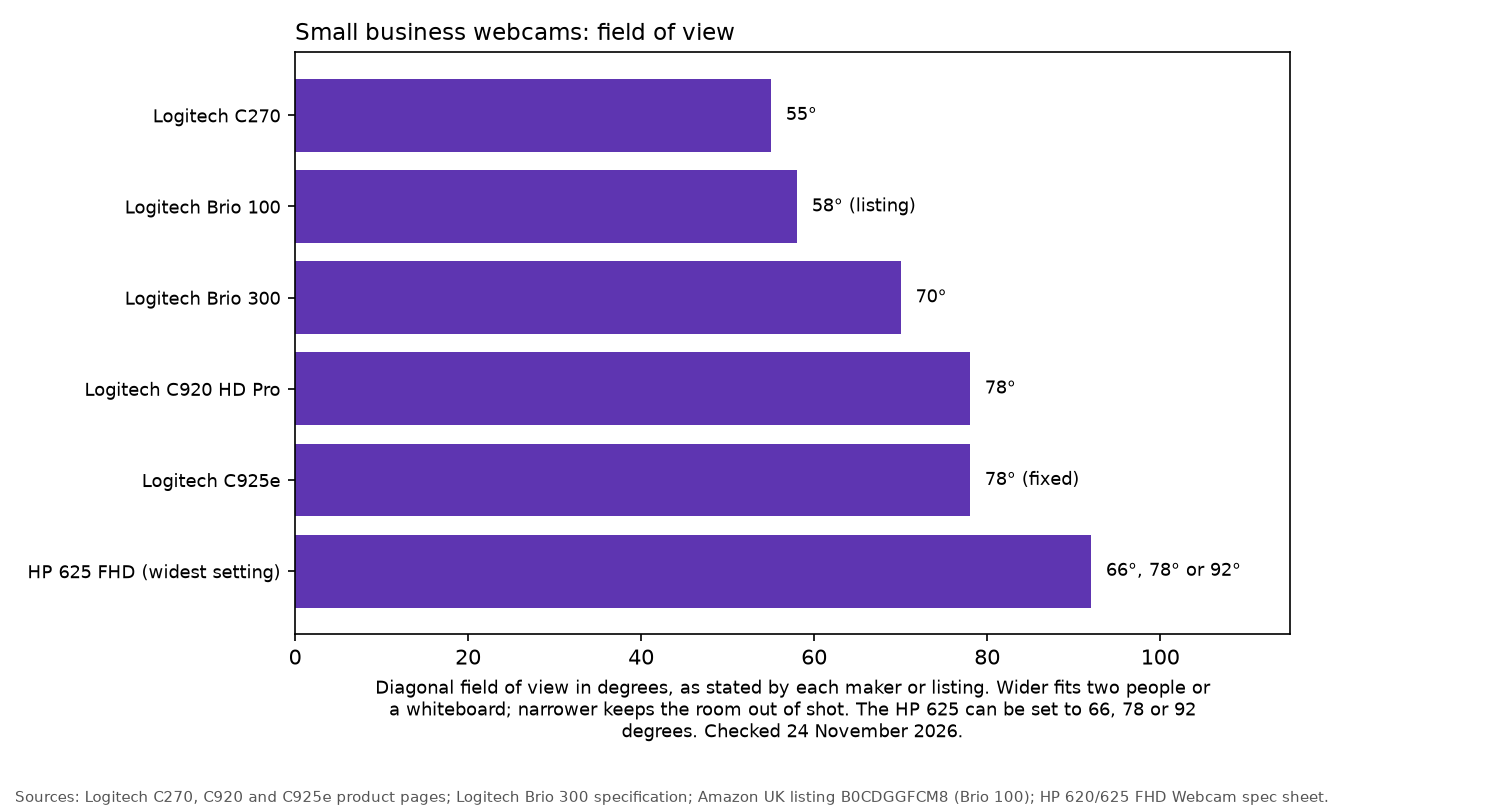
Field of view is how wide the camera sees. A narrow view keeps a busy shop floor or a stock room out of shot; a wide one fits two people or a whiteboard. The chart adds the Logitech C270 for reference.
Logitech Brio 300: best overall
The Brio 300 records 1080p, and Logitech's RightLight 2 adjusts for poor light. It has a mono noise-reducing mic, a privacy shutter you spin shut, a 70° diagonal field of view and a USB-C cable. The listing says it is certified for Zoom, Microsoft Teams and Google Meet, and Logitech says the plastic parts use at least 48% recycled plastic.
Who it's for: a modern laptop or monitor with USB-C, and anyone who wants a shutter. Who it isn't for: older PCs with only USB-A ports, unless you add an adapter.
Logitech C920 HD Pro: best picture for the money
TechRadar names the C920 the best Logitech webcam overall, praising its low-light performance and colour for the price. Logitech lists 1080p at 30fps through a full HD glass lens, autofocus, HD auto light correction, a 78° field of view and dual mics for stereo sound. TechRadar's downsides are no 1080p at 60fps and a fixed camera with no swivel, and the Amazon listing does not mention a privacy cover.
Who it's for: most staff on daily video calls. Who it isn't for: anyone whose policy expects a physical shutter.
Logitech C925e: best for shared office bandwidth
The C925e is Logitech's business model. It supports H.264 with Scalable Video Coding and UVC 1.1 encoding, which Logitech says reduces the load on the computer and the network so video stays smooth when bandwidth is limited. It has 1080p/30 with autofocus, a fixed 78° view, two omnidirectional mics that pick up voices up to one metre away and an integrated privacy shutter. Logitech says it is certified for Google Meet and works with Microsoft Teams and Zoom, and the Logi Tune desktop app adds zoom, colour and focus controls plus firmware updates. TechRadar calls it the best Logitech webcam for offices but pricey for one person.
Who it's for: offices where several people share one connection. Who it isn't for: small meeting rooms; a conference speakerphone and a wider camera suit those better.
HP 625 FHD: best for two people or a small room
HP's spec sheet for the 620/625 lists a 4MP sensor, 1080p at 30fps or 720p at 60fps, autofocus, auto lighting correction and dual noise-reducing microphones. The field of view can be set to 66°, 78° or 92°, with AI face framing, a 360° swivel and a 90° downward tilt. It has a privacy cap and connects by USB-A 3.0, and HP says it has Zoom certification. Settings are adjusted in HP Accessory Center. HP's spec sheet and the Amazon listing refer to HP Accessory Center, while HP's current UK store page refers to Poly Lens. HP's spec sheet gives 5x digital zoom, while HP's current UK store page gives 4x, so check the listing.
Who it's for: two people at one desk, or a reception that also does calls. Who it isn't for: Mac users; the Amazon listing names only Windows 10 and 11.
Logitech Brio 100: best budget
The Brio 100 is a 1080p webcam with a built-in mic, a privacy slider and a USB-A plug. Its listing says Logitech's RightLight boosts brightness by up to 50% compared with previous-generation Logitech webcams, and that it works with Microsoft Teams, Zoom and Google Meet. The listing gives a 58° viewing angle, so it frames one person closely.
The older Logitech C270 is cheaper still, but Logitech lists it at 720p/30 with a 55° view and the Amazon listing mentions no privacy cover, so the Brio 100 is the better buy for most offices.
Who it's for: kitting out several desks at low cost. Who it isn't for: open-plan offices, unless staff use a wireless headset for audio.
How to choose a webcam for a small business
- 1080p is enough. Microsoft says Teams sends up to 1080p at 30fps, and TechRadar says Meet caps calls at 720p, so the platform will scale down a higher resolution.
- Privacy shutter: a physical cover is the simplest way to show staff and clients the camera is off. Four of the five picks have one.
- USB-A or USB-C: check the ports on your small business laptops before you buy several. The Brio 300 is USB-C; the others here are USB-A.
- Managed work laptops: all five are plug-and-play USB webcams, but extra software such as Logi Tune or HP Accessory Center or Poly Lens may need IT approval.
- Mic or headset: a webcam mic is fine in a quiet room. In a shared office, a headset cuts background noise better.
Three free fixes before you buy
- Light your face, not your back. A window or lamp in front of you does more than a new camera. Sitting with a window behind you turns your face dark.
- Raise the camera to eye level. Put the laptop on a stand or a stack of books, or clip the webcam to the top of a monitor.
- Use the software. Zoom's video settings include Adjust for low light, and Logitech notes most meeting platforms can blur your background.
FAQ
Is a 4K webcam worth it for business calls?
Rarely. Teams sends up to 1080p, and Meet caps calls at 720p according to TechRadar, so 4K mostly helps recordings and streaming.
Do webcams work with Microsoft Teams without software?
These five are plug-and-play USB webcams. The Brio 300 listing says it is certified for Teams, and Logitech says the C925e works with Teams.
What is a good field of view for video calls?
For one person, about 70° to 78° frames head and shoulders. For two people or a whiteboard, a wider setting such as the HP 625's 92° helps.
Does a webcam need a privacy shutter?
It is not required, but a cover gives certainty the camera is blocked. The Brio 300, Brio 100, C925e and HP 625 all have one.
As an Amazon Associate I earn from qualifying purchases.
More from MBusinessDaily: Business · How we review
Keep reading
- Run the Business Best Conference Speakerphone for Small Business UK
- Run the Business Best Laptop for Small Business UK
- Run the Business Best Wireless Headset for Office Calls in the UK