Best Monitor for Office Use UK (2026)
The Dell 27 Plus 4K (S2725QC) suits most laptop users: one USB-C cable for the picture, data and up to 65W of charging. The size and resolution table matches a screen to the work.

The best monitor for office UK desks is the Dell 27 Plus 4K (S2725QC) for most laptop users. Its 27-inch 4K IPS screen runs at 120Hz, while a single USB-C cable handles the picture, data and up to 65W of laptop charging.
If you want smoother scrolling or prefer to avoid display scaling, the Dell 27 Plus QHD (S2725DC) offers a similar setup at 1440p. For dual-screen desks, the 24-inch Dell P2425H and iiyama XUB2493HSU are good options. The BenQ GW2790 offers a larger 27-inch screen for a tighter budget. The task table below helps you choose the right size and resolution for your work.
Specs come from the UK Amazon listings, checked on 19 November 2026, plus published reviews that we credit by name. We have not tested these monitors ourselves. This guide brings published information together.
Jump to: Quick picks · Size and resolution by task · Spec table · The monitors · How to choose · FAQ
Quick picks
We may earn a commission if you buy through links on this page. It never changes our verdicts. How we review.
- Best overall: Dell 27 Plus 4K USB-C (S2725QC), 4K 120Hz, 65W USB-C
Check price on Amazon - Best 1440p: Dell 27 Plus QHD USB-C (S2725DC), 144Hz, 65W USB-C
Check price on Amazon - Best 24-inch for dual screens: Dell P2425H, 1080p 100Hz, 3-year warranty
- Best budget height-adjustable: iiyama ProLite XUB2493HSU-B7, 150 mm height adjustment
- Budget 27-inch: BenQ GW2790, 1080p 100Hz
Which size and resolution by task
Pixel density makes a noticeable difference to how sharp text looks. It measures how many pixels fit into each inch of the screen.
The pixel-density figures below, and on the chart, are our own arithmetic. We worked them out from each monitor's screen size and resolution, and rounded to the nearest whole number. They are not a measurement from a listing. The task suggestions are our own.
| Task | Suggested size and resolution | Why | Monitor on this page |
|---|---|---|---|
| Email, documents, web apps | 23.8-inch 1080p (sold as 24-inch) | About 93 pixels per inch; the usual office standard, and it fits small desks | Dell P2425H, iiyama XUB2493HSU-B7 |
| Big spreadsheets | 27-inch 1440p or 4K | More rows and columns on screen; 1440p gives about 109 pixels per inch | Dell S2725DC, Dell S2725QC |
| Design, photos, reading small text | 27-inch 4K | About 163 pixels per inch, so text and images look crisp (with display scaling) | Dell S2725QC |
| Dual-screen setup | Two 23.8-inch 1080p screens | Two matching screens side by side; slim bezels help. Sold as 24-inch | Dell P2425H or iiyama XUB2493HSU-B7, in pairs |
| One-cable laptop desk | 27-inch with USB-C power delivery | Picture, USB and charging over one lead | Dell S2725QC or S2725DC (65W) |
| Tight budget, bigger screen | 27-inch 1080p | Bigger image but lower density (about 82 pixels per inch), so text looks softer | BenQ GW2790 |
The 93 pixels per inch figure uses the 23.8-inch panel size on the Dell P2425H and iiyama listings. Both monitors are sold as 24-inch.
If your laptop's charger is rated above 65W, OhmNook says a 65W monitor usually still charges it, more slowly, and may not keep up under a heavy load. OhmNook recommends the Dell UltraSharp U2725QE for these users, as it delivers up to 140W.
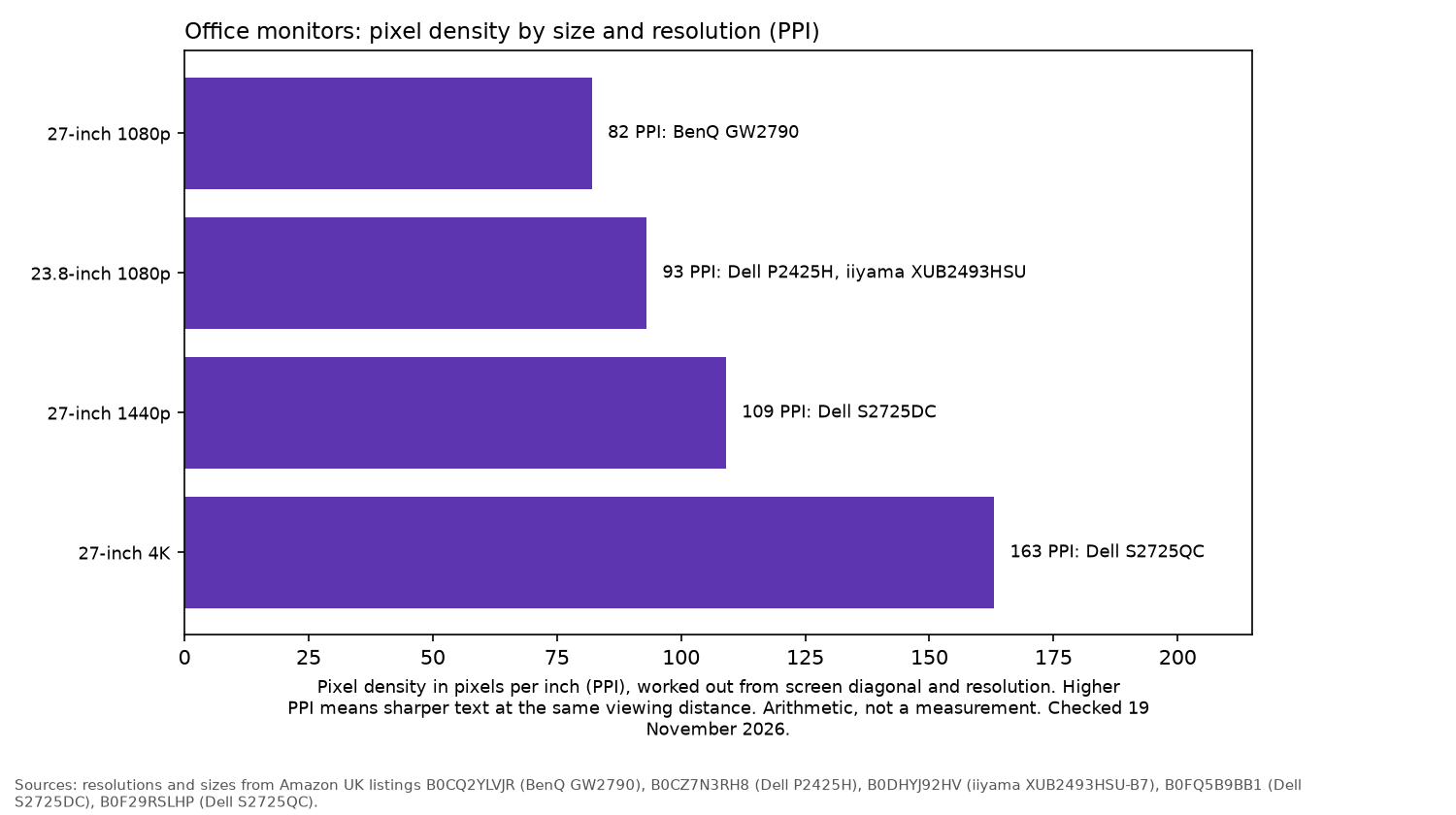
The chart uses that same arithmetic. It is not a measurement from a listing.
Spec table
| Monitor | Size and panel | Resolution and refresh | USB-C | Stand (listing) | Warranty (listing) |
|---|---|---|---|---|---|
| Dell S2725QC | 27-inch IPS | 3840 x 2160, 120Hz | Upstream 65W, downstream 15W | Height (listing); tilt, swivel, pivot (OhmNook) | 1-Year Advanced Exchange (details table; the title says 3 years) |
| Dell S2725DC | 27-inch IPS | 2560 x 1440, 144Hz | 65W charging, plus 15W downstream | Height, tilt, swivel, pivot | 3 years |
| Dell P2425H | 23.8-inch IPS | 1920 x 1080, 100Hz | 15W downstream only | Height 150 mm, tilt, swivel, pivot | 3 years |
| iiyama XUB2493HSU-B7 | 23.8-inch IPS | 1920 x 1080, 100Hz | None (USB 2.0 hub) | 150 mm height adjustment | 3 years |
| BenQ GW2790 | 27-inch IPS | 1920 x 1080, 100Hz | None (HDMI, DisplayPort) | Tilt only | 2 years |
Checked 19 November 2026. Where a listing's title and details table disagree, that is spelled out under the pick.
Dell 27 Plus 4K (S2725QC): best overall
The UK listing specifies a 27-inch 4K IPS panel with a 120Hz refresh rate, 99% sRGB coverage and TÜV Rheinland 4-star eye comfort certification. It also includes two 5W speakers, two HDMI 2.1 ports and a single USB-C connection for "video, data, and 65W charging". The port diagram lists a second USB-C port at 15W downstream.
OhmNook says "For most UK home offices, the best USB-C monitor is the Dell 27 Plus 4K (S2725QC)." Its review also describes 5Gbps data and a stand with height, tilt, swivel and pivot. The listing's port diagram lists USB 5Gbps, and the title and features include height adjustment.
RTINGS says you may prefer the S2725QC in a bright room, because reflected light does not have a pink tint like the U2725QE.
The details table lists the warranty as 1-Year Advanced Exchange Service and Premium Panel Exchange. The product title on the same Amazon page says 3 years.
- Who it's for: laptop users who want one cable and crisp text
- Who it isn't for: laptops that need more than 65W, or anyone who dislikes display scaling
Dell 27 Plus QHD (S2725DC): best 1440p
The Dell S2725DC offers a 2560 x 1440 IPS display at 144Hz, with brightness rated at 350 cd/m². Its USB-C connection delivers up to 65W of power, and there is a separate 15W downstream USB-C port.
HDMI and DisplayPort 1.4 are included, along with a stand that adjusts for height, tilt, swivel and pivot. The listing also specifies a 3-year warranty, and the title agrees. The same bullets include TÜV 4-star eye comfort certification.
OhmNook points out that the 1440p screen "runs happily at 100% scaling". It also says text is less crisp than 4K at this size.
- Who it's for: spreadsheet work without scaling, and smoother scrolling
- Who it isn't for: anyone who wants the sharpest possible text
Dell P2425H: best 24-inch for dual screens
The Dell P2425H has a 23.8-inch 1080p IPS panel running at 100Hz, with 99% sRGB coverage. It includes ComfortView Plus to reduce blue light and carries a 4-star eye comfort certification. The picture-quality line on the listing names TÜV eye comfort certification.
Connections include DisplayPort, HDMI, VGA and a downstream USB-C port that supplies 15W. That is not a laptop-charging connection.
The listing describes 150 mm of height adjustment, plus tilt, swivel and pivot, and a 3-year warranty. Amazon flags a newer model of this item, the P2426H.
- Who it's for: two-screen desks and office-wide rollouts
- Who it isn't for: one-cable laptop setups
iiyama ProLite XUB2493HSU-B7: best budget height-adjustable
The iiyama ProLite XUB2493HSU-B7 has an edge-to-edge 23.8-inch IPS screen, described in the listing as "ideal for multi-monitor setups". It offers 1080p resolution at 100Hz, 300 cd/m² brightness and AdaptiveSync.
You also get built-in speakers, two USB ports, HDMI and DisplayPort. The screen is flicker-free and includes blue light reduction.
It has a 150 mm height-adjustable stand. The warranty lasts 3 years.
- Who it's for: budget desks that still need proper height adjustment
- Who it isn't for: USB-C laptop docking
BenQ GW2790: budget 27-inch
The BenQ GW2790 provides a 27-inch 1080p IPS display with a 100Hz refresh rate. Its reading features include Coding Mode and ePaper Mode, alongside Low Blue Light Plus and automatic brightness adjustment through Brightness Intelligence.
There is also an input hotkey, with HDMI and DisplayPort for connections. The listing specifies tilt adjustment only, and a 2-year warranty.
Its main compromise is text sharpness. Stretching 1080p across 27 inches makes text look softer than on the other monitors here.
- Who it's for: a bigger screen on a small budget
- Who it isn't for: dense spreadsheets, or anyone needing height adjustment
How to choose an office monitor
- Resolution and size together: Start with the task table. A 27-inch 1080p screen can look soft when displaying text. Moving to 1440p or 4K improves sharpness.
- USB-C power delivery: Check your laptop charger's wattage and choose a monitor with suitable power delivery.
- Stand: HSE's display screen guidance recommends keeping the top of the screen level with your eyes, about an arm's length away, with the screen and keyboard centred. A height-adjustable stand helps. If the monitor only tilts, you may need a riser or monitor arm.
- Eye comfort: Flicker-free backlights and blue light modes are common. TÜV 4-star eye comfort is listed on the Dell S2725QC, S2725DC and P2425H.
- Refresh rate: All five monitors run at 100Hz or higher. Dell's P2425H listing describes the benefit as "more seamless scrolling", although resolution matters more for everyday office work.
- Ports: Check how many connections you need. HDMI can be useful for a second laptop, while DisplayPort provides a connection for a desktop.
More for the office: a standing desk, laptops for small business and wireless headsets.
FAQ
What size monitor is best for office work?
For most office tasks, a 24-inch 1080p monitor (the panels here are 23.8 inches) or a 27-inch 1440p monitor is a good choice. If particularly sharp text is a priority, consider a 27-inch 4K screen.
Is 4K worth it for office work?
Often, especially for reading and design. A 27-inch 4K monitor has about 163 pixels per inch on our arithmetic, compared with roughly 109 at 1440p. You will usually need display scaling.
Can a monitor charge my laptop?
Yes, provided it supports USB-C power delivery. Both the Dell S2725QC and S2725DC can supply up to 65W.
Is a dual monitor setup better than one big screen?
Two 24-inch monitors provide more total screen area and work well for tasks arranged side by side. A single 27-inch monitor has the advantage of no bezel running through the middle.
Do I need a high refresh rate for office work?
Not necessarily. Scrolling looks smoother at 100Hz than at 60Hz, and all five monitors here support at least 100Hz. For everyday office work, resolution and stand adjustment are more important.
How high should a monitor be?
HSE recommends placing the top of the screen level with your eyes, with the monitor about an arm's length away.
As an Amazon Associate I earn from qualifying purchases.
More from MBusinessDaily: Business · AI tools · How we review
Keep reading
- Run the Business Best Standing Desks for Small Business (UK)
- Run the Business Best Laptop for Small Business UK
- Run the Business Best Wireless Headset for Office Calls in the UK